Skip to content

Reports & analytics

A report should show where you lose margins

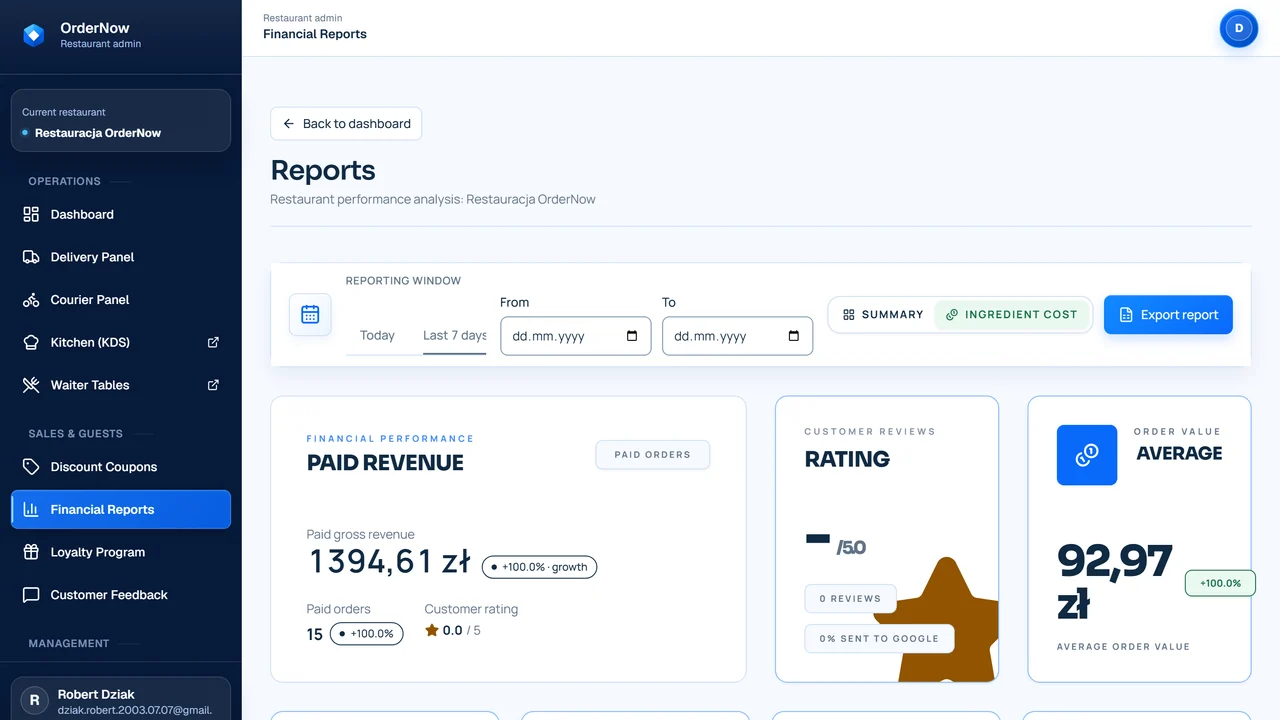
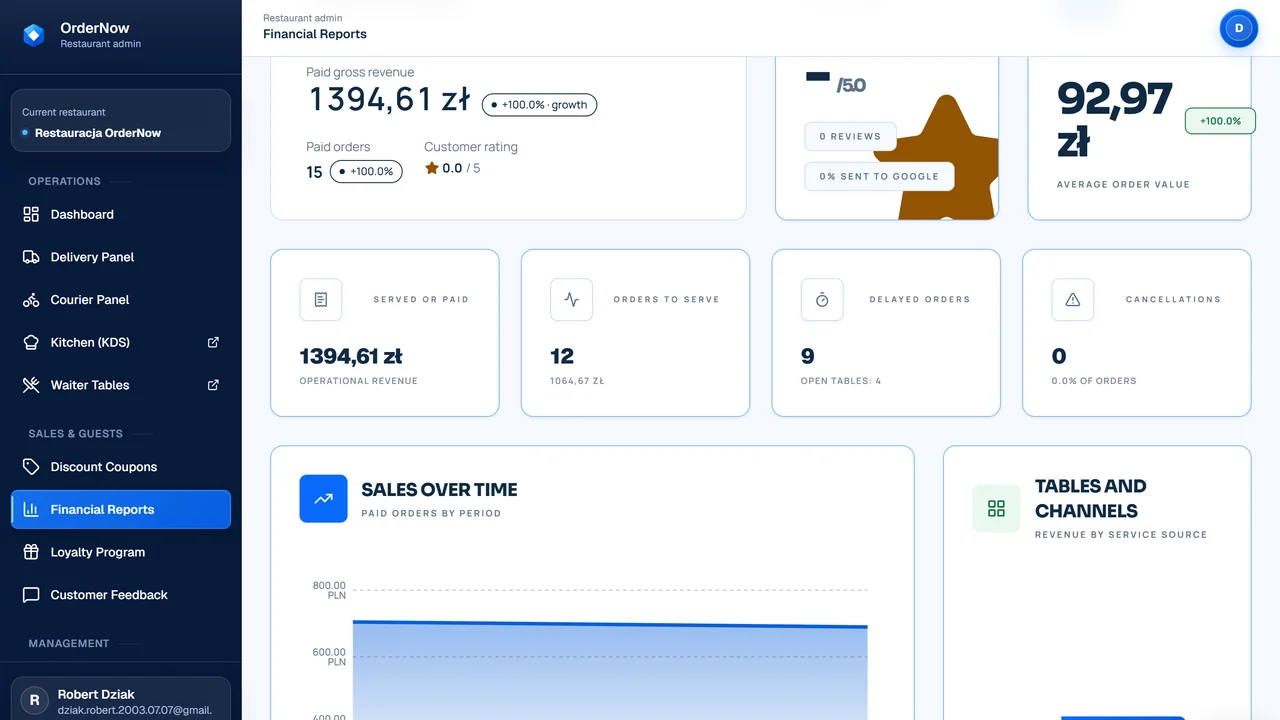
Reports and analytics in OrderNow connect sales, ordering channels, menu, inventory, and team schedules. This way, the owner doesn't just look at revenue, but can check which dishes, hours, and channels require a decision.

sales by channels and categories
menu and Food Cost
comparing traffic with staffing
data export for further analysis

From data to decision

Sales › cost › decision

System1

Collects data from several processes

Sales, online orders, menu, inventory, and schedules end up in one view of the venue.

Manager2

Picks a question to check

Can check margin, sales channel, product, hour, team, or cost.

Report3

Shows the result in context

Instead of just the sales sum, you see what creates it and what you need to compare it against.

What happens when you only look at revenue

High sales don't always mean a good result. Without the context of costs, channels, and staffing, it's easy to make decisions based on a fraction of the picture.

You see sales, but you don't see margins

A dish might sell well, but after accounting for ingredients, portions, and price, it might not contribute well to the venue's bottom line.

Sales channels mix into one result

Dine-in, pickup, delivery, and online channels have different costs. A single revenue number doesn't show which channel truly performs.

Promotions are judged by feeling

Without data on coupon usage, average check, and costs, it's hard to tell if a promotion helps or just lowers the price.

Schedule is not compared with traffic

A manager might have too few people during a rush or too many during quiet hours, but without comparing to traffic, it's hard to notice.

How a report leads from data to decision

A report doesn't make decisions for the owner. It aims to organize data so you can quickly see what's worth asking about.

System01

Collects data from several processes

Sales, online orders, menu, inventory, and schedules end up in one view of the venue.

Manager02

Picks a question to check

Can check margin, sales channel, product, hour, team, or cost.

Report03

Shows the result in context

Instead of just the sales sum, you see what creates it and what you need to compare it against.

Owner04

Compares result with costs and process

Data only makes sense when you see ingredients, staffing, channel, and service method.

Team05

Makes a specific decision

The change could be price, portion, promotion, staffing, delivery, or menu layout.

Manager06

Checks the effect after change

After implementing a decision, you can return to the report and see if the situation actually improved.

Before & after: revenue in a spreadsheet vs report in context

Sales
Old processThe owner sees daily revenue and manually looks for what built it.
OrderNowThe report breaks down sales by channels, categories, hours, and products.
Menu
Old processPopular items are judged by order count, without clear ingredient costs.
OrderNowThe menu can be analyzed together with recipes, Food Cost, and product margin.
Staffing
Old processSchedules are built on experience, without comparing to traffic.
OrderNowThe manager can compare work hours with traffic, sales, and staffing costs.
Promotions
Old processCoupons and discounts are judged by order count or team comments.
OrderNowYou can see usage, order value, promotion cost, and which channel brought guests.

Which venues benefit most from reports

They provide the most value when a venue collects data from several areas and wants to make decisions more calmly than based on revenue alone.

  • owners and managers of multiple locations
  • venues with extensive menus and variable ingredient costs
  • restaurants with online channels, deliveries, and promotions
  • places that want to control Food Cost and plan price changes

When reports aren't the first priority

Data is only as good as the collection process. If the basics are disorganized, a report might show an incomplete picture.

  • a venue without an organized menu and sales in the system
  • a restaurant that doesn't keep recipes or inventory
  • a very small venue where the owner controls everything manually
  • a stage where setting up basic order fulfillment is more important

What to measure so a report isn't just a chart

A report should lead to a decision. It works best when the owner regularly checks the same metrics and compares them with the venue's process.

Sales by channels

Helps separate dine-in, pickup, delivery, and owned channels instead of throwing everything into one sum.

Product margins and Food Cost

Shows which items require price, portion, recipe, or purchasing adjustments.

Peak traffic hours

Facilitates discussions about staffing, kitchen prep, and shift planning.

Staffing cost

Allows comparing schedules with traffic and sales, without promising magical savings.

Promotion effectiveness

Coupons should be evaluated by usage, average check, discount cost, and returns post-campaign.

Differences between sales and usage

Comparing sales with ingredients helps notice shortages, waste, or recipe issues.

Reports don't increase profit on their own. They help you quickly notice questions the owner and manager should ask before making a decision.

Questions owners ask before implementing reports

Do reports show dish margins?

Yes, if the venue keeps recipes, ingredient prices, and sales in the system. Without this data, a report can show sales but not the full product cost.

Do reports connect with inventory?

Yes. Connecting with inventory and recipes allows comparing sales with real ingredient usage.

Can I compare sales channels?

Yes. It's worth separating dine-in, pickup, delivery, owned channels, and marketplace, because each channel has different costs and processes.

Does the report suggest decisions itself?

No. A report organizes data and helps find problems faster, but the decision about price, promotion, staffing, or menu remains with the owner.

Can data be exported?

Yes. Exports help analyze data outside the system, prepare statements for accounting, or compare results over a longer period.

When will reports not give a full picture?

When menu, recipes, inventory, ordering channels, or work hours aren't maintained consistently. A report won't fix missing data.

Demo with no overpromises

See reports using your process as an example

On a demo, we will go through sales, channels, menu, Food Cost, and staffing without promising magical recommendations.