Skip to content

Kitchen Display System (KDS)

End the constant kitchen interruption: "how much longer?"

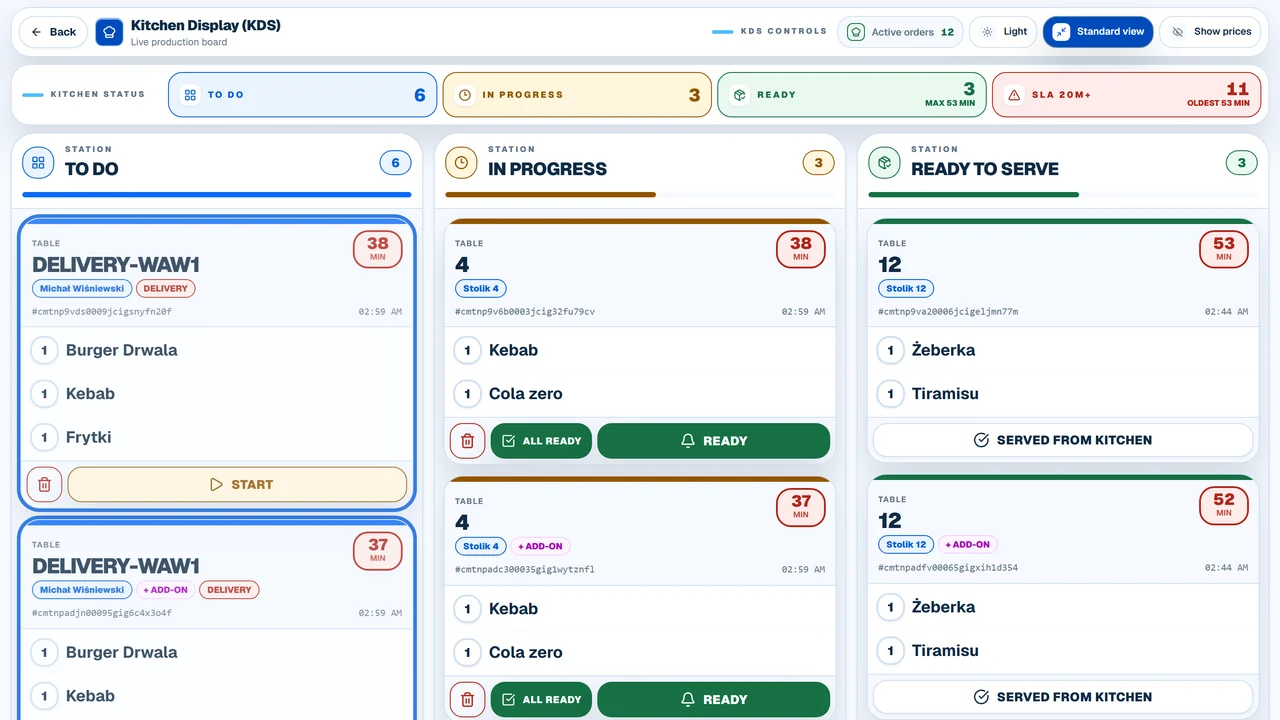
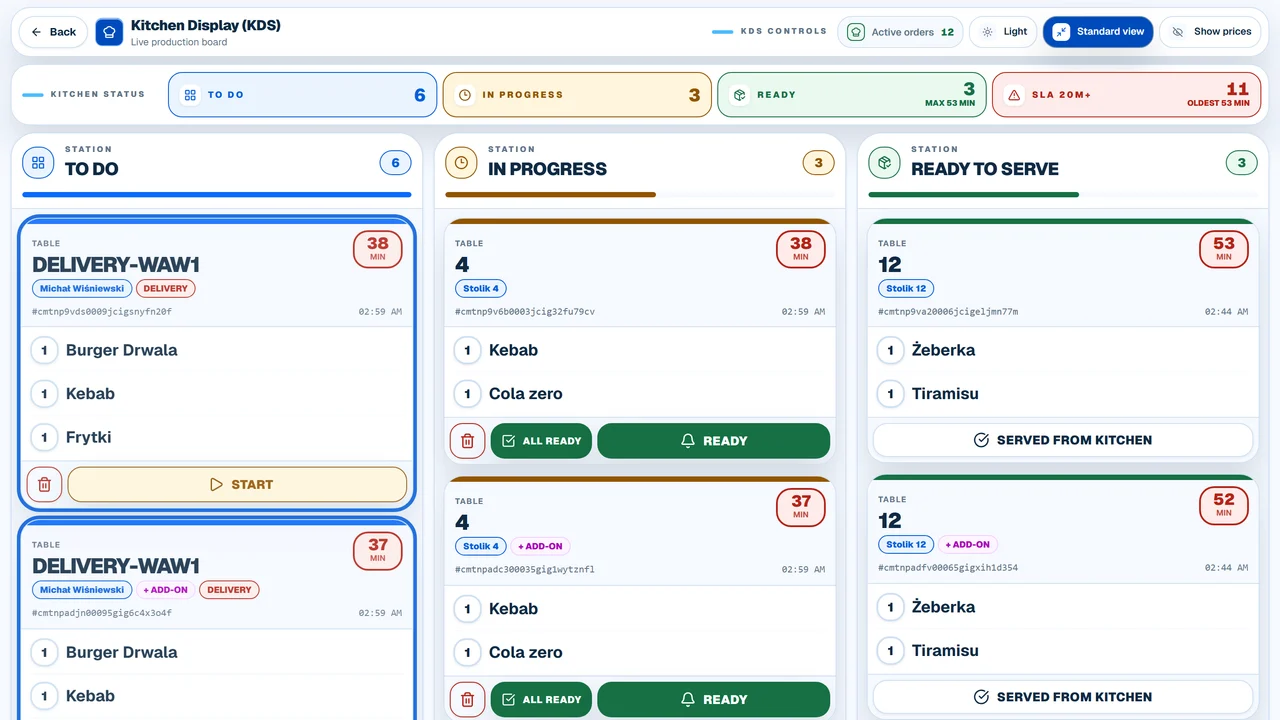
KDS organizes kitchen orders into a single, clean queue: to do, in preparation, and ready for pickup. Servers see order status instantly, while chefs can focus on cooking without handling paper tickets or answering questions.

System flow

From order to pickup

Server, QR, or online01

Order enters the system

Items sent from the server panel, guest QR codes, or your own online ordering website flow into a shared kitchen queue.

Kitchen02

KDS displays the pending queue

The kitchen crew sees what's waiting, what's being prepared, and which orders should be prioritized next.

Stations03

Status updates during prep

The chef marks an order as 'in prep' or 'ready'. This instantly stops servers from asking about its status.

Front-of-house04

Server knows when to pick up

Staff get a clear notification that the order is ready without having to step into the hot kitchen to check.

In short

What this feature changes in daily work

What it does

fewer status inquiries to the kitchen

A kitchen display screen for restaurants that organizes the order queue, preparation statuses, and communication between front-of-house and kitchen.

Who it helps

restaurants with dine-in, patio, or multiple service zones

KDS delivers the most value where a kitchen handles multiple order channels or several prep stations simultaneously.

Works with

Server Panel, QR Menu, Reports and Analytics

KDS is most effective when integrated. It works best when an order flows through the entire process without manual re-entry.

Before / after

Before and After: Paper Tickets vs. Kitchen Display System

With low traffic, paper tickets might get by. The real problem starts when dine-in, patio, phone, and online orders flood the kitchen all at once.

Without KDS
With KDS
Order Queue
Paper tickets, handwritten notes, or verbal callouts.
A single digital queue organized by preparation status.
Server Inquiries
Servers walk into the kitchen to ask about prep status.
Order status is visible in real-time on the system.
Priorities
The loudest query from a server gets prioritized over older orders.
The team clearly sees which orders have waited the longest.
Kitchen Stations
Grill, pizza, bar, and plating all work off the same messy pile of paper.
Customized views tailored to the specific needs of each prep station.
Post-shift Analysis
Only a vague feeling of chaos remains after a busy weekend.
Detailed metrics on prep times and bottlenecks show exactly where to improve.

Process

How an order flows from table to kitchen to pickup

A KDS doesn't turn the kitchen into a click-heavy workstation. It simply shows the queue and status so the team doesn't have to coordinate everything verbally.

01
Server, QR, or online

Order enters the system

Items sent from the server panel, guest QR codes, or your own online ordering website flow into a shared kitchen queue.

02
Kitchen

KDS displays the pending queue

The kitchen crew sees what's waiting, what's being prepared, and which orders should be prioritized next.

03
Stations

Status updates during prep

The chef marks an order as 'in prep' or 'ready'. This instantly stops servers from asking about its status.

04
Front-of-house

Server knows when to pick up

Staff get a clear notification that the order is ready without having to step into the hot kitchen to check.

Fit

Where a KDS makes the most sense

KDS delivers the most value where a kitchen handles multiple order channels or several prep stations simultaneously.

Where a KDS makes the most sense

KDS delivers the most value where a kitchen handles multiple order channels or several prep stations simultaneously.

  • restaurants with dine-in, patio, or multiple service zones
  • pizzerias, bistros, sushi bars, and high-volume rush-hour spots
  • kitchens split into stations (e.g., grill, pizza, bar, plating)
  • venues combining dine-in, QR code ordering, phone, and online channels
  • teams where servers frequently ask the kitchen about order status

When a KDS is not the first priority

Not every venue should start with a KDS. Sometimes simpler operational elements need sorting first.

  • small venues with low traffic where one person handles orders, prep, and cash
  • menus, POS settings, or basic order flows are not yet organized
  • no stable mounting spot for a tablet or screen, or poor kitchen Wi-Fi
  • no clear agreement on who is responsible for changing order statuses

What to measure

What to measure after implementation

A KDS shouldn't be judged just by screen appearance. Check if it reduces friction in the areas that hurt your team the most.

Status inquiries

Track whether servers interrupt the kitchen crew less often with questions about specific orders.

Order-to-pickup times

Compare how long orders take to go through prep in quiet hours versus peak rushes.

Queue errors

Monitor whether fewer orders are sent back due to lost tickets, incorrect ordering, or outdated info.

Station load

Identify if delays stem from a single prep station, staffing shortages, or order spikes.

These are not guaranteed outcomes. These are specific operational metrics to track to see if the KDS is genuinely helping your team.

FAQ before implementing a KDS

Does a KDS replace a kitchen printer?

It can replace a printer for many processes, but it doesn't have to. Some venues keep a printer as a backup or during a transition phase. The key is defining which stations will work fully off the screen.

Do chefs have to tap the screen constantly?

No. The purpose of a KDS is simple status tracking: to do, in prep, and ready. If the workflow requires too many taps, it should be simplified before launch.

Is a tablet enough, or do I need a large monitor?

It depends on the kitchen size. In smaller spots, a tablet in a good mounting spot is often enough. For larger prep stations, a larger screen or separate station views are much better.

What if the kitchen internet or Wi-Fi is weak?

You should fix the network coverage in the kitchen first. A KDS needs a stable connection to prevent the screen from becoming a source of stress and missed orders.

Does KDS work with QR codes, server panel, and online orders?

Yes, that's the whole point of a unified system. Orders from all sources flow into one queue so the kitchen crew doesn't have to manage multiple separate lists.

How long does it take for a kitchen team to adapt to a KDS?

Usually, the main step is agreeing on rules: who changes the status, when an order is officially ready, and how FOH gets notified. The screen interface itself is very easy to learn.

Demo without overpromises

See KDS in action during rush hour

On our demo call, we'll walk through the order queue, kitchen statuses, front-of-house views, and setups that fit your restaurant's style.