Skip to content

Waiter POS

Waiter takes orders at the table, without returning to the till

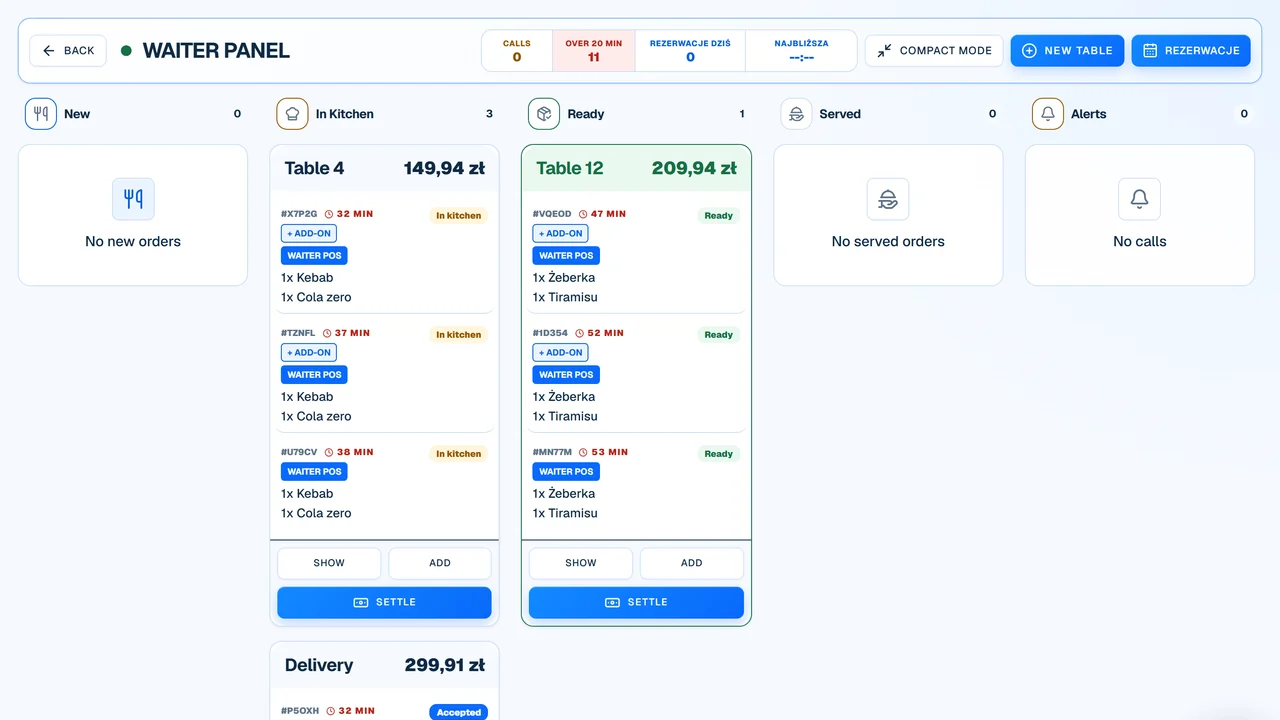
The waiter panel lets you record the order right at the table and send it straight to the kitchen or bar. The team saves time on retyping, and the guest sees their order is being processed faster.

less walking between table and till
less order retyping
faster ticket handover to kitchen
better table status control

Service process

Table → kitchen

Waiter1

Selects the table

Service starts from a specific table, so the bill and status remain tied to the physical location.

Waiter2

Adds items, variants, and notes

Dishes, add-ons, cooking preference, or guest requests go straight into the order.

System3

Routes order to the right section

Items can go to the kitchen, bar, or another prep view according to the venue's setup.

What slows down service without a tableside panel

The till itself isn't the problem. The problem is the journey between the guest, the notepad, the till, the kitchen, and back to the table.

Waiter vanishes from the guest area

After taking an order, they must return to the till, type in items, and only then serve the next table.

Notepad creates a second information loop

Guest notes, modifiers, and add-ons live on a piece of paper for a while before entering the system and kitchen.

The till becomes a bottleneck

With a full house, several people try to punch in orders or close bills at the exact same spot.

Table status is hard to catch

The waiter has to ask the kitchen or return to the system to check what's happening with the order.

How an order moves from table to kitchen

The waiter panel shortens the order's journey. Key information enters the system at the guest's side, not after returning to the till.

Waiter01

Selects the table

Service starts from a specific table, so the bill and status remain tied to the physical location.

Waiter02

Adds items, variants, and notes

Dishes, add-ons, cooking preference, or guest requests go straight into the order.

System03

Routes order to the right section

Items can go to the kitchen, bar, or another prep view according to the venue's setup.

Kitchen / bar04

Sees the order without retyping

The team works with panel data instead of waiting for a paper ticket or extra explanations at the pass.

Waiter05

Returns to guest with info

Can take extra orders, check status, or close the bill faster at the table.

Before & After: notepad + till vs waiter panel

Order taking
Notepad + tillWaiter writes down items and returns to the till to retype them.
Waiter panelOrder enters the system directly at the table.
Guest notes
Notepad + tillNotepad scribbles can be illegible or lost along the way.
Waiter panelVariants and notes are pinned to the item before the order moves on.
Queue at the till
Notepad + tillSeveral waiters wait at one station during rush hour.
Waiter panelOrders from the floor can be taken in parallel on service devices.
Table status
Notepad + tillStaff checks status at the till or asks the kitchen.
Waiter panelWaiter sees the order and can react faster to status changes.
Extra orders
Notepad + tillAnother request means another trip from table to till.
Waiter panelWaiter adds the item at the guest's side and sends it instantly.

Which venues benefit most from a waiter panel

The biggest value appears where the floor is larger than a single service point, and waiters often return to the till just to type in an order.

  • restaurants with table service
  • beer gardens, large floors, and venues with multiple service zones
  • restaurants with a kitchen, bar, or several prep sections
  • places where the till is far from a section of tables
  • venues looking to reduce retyping from notepad to system

When a waiter panel isn't the first priority

A mobile panel won't solve the problem if the venue doesn't use table service or the entire process happens at the counter anyway.

  • very small venues with one service point and a short distance to the till
  • venues without table service, based almost entirely on the counter
  • places that mainly take takeaway orders at the till
  • venues without stable Wi-Fi in the dining room, garden, or service area

What to measure after deploying a waiter panel

A waiter panel should shorten the path of information. It's worth measuring not just sales, but also the number of steps and points where orders must be retyped.

Returns to the till

Check how many times a waiter returns to the station just to punch in an order or add-on.

Order taking time

Compare the time from the guest's decision to the order appearing in the kitchen or bar.

Retyping errors

Observe if there are fewer clarifications regarding illegible notes, skipped variants, or forgotten add-ons.

Table status control

See if staff knows faster which tables are waiting, ordering more, or nearing payment.

This depends on the floor layout, number of waiters, network quality, and team rules. The panel organizes the process but doesn't replace floor management.

Questions from owners before deploying a waiter panel

Does the waiter panel require expensive tablets?

Not always. A stable device, clear screen, good battery, and durability during service are more important.

Does the panel work with KDS?

Yes. The point of the panel is that an order taken at the table can go straight to the kitchen or bar without retyping.

Can the panel be used in a beer garden?

Yes, if there is stable internet or Wi-Fi in the garden. Without it, the panel will hinder rather than speed up work.

Can the waiter add notes and variants?

Yes. Guest notes, variants, and add-ons should be attached to specific items before the order reaches the kitchen.

Does the panel replace a stationary till?

Not necessarily. In many venues, the panel acts as a mobile extension of the process, while the till still handles some payments or back-office tasks.

What needs to be prepared before rollout?

First, it's worth organizing tables, menu, variants, kitchen sections, and status workflows. A tablet alone won't fix an unclear process.

Demo with no overpromises

See the waiter panel on a full restaurant floor

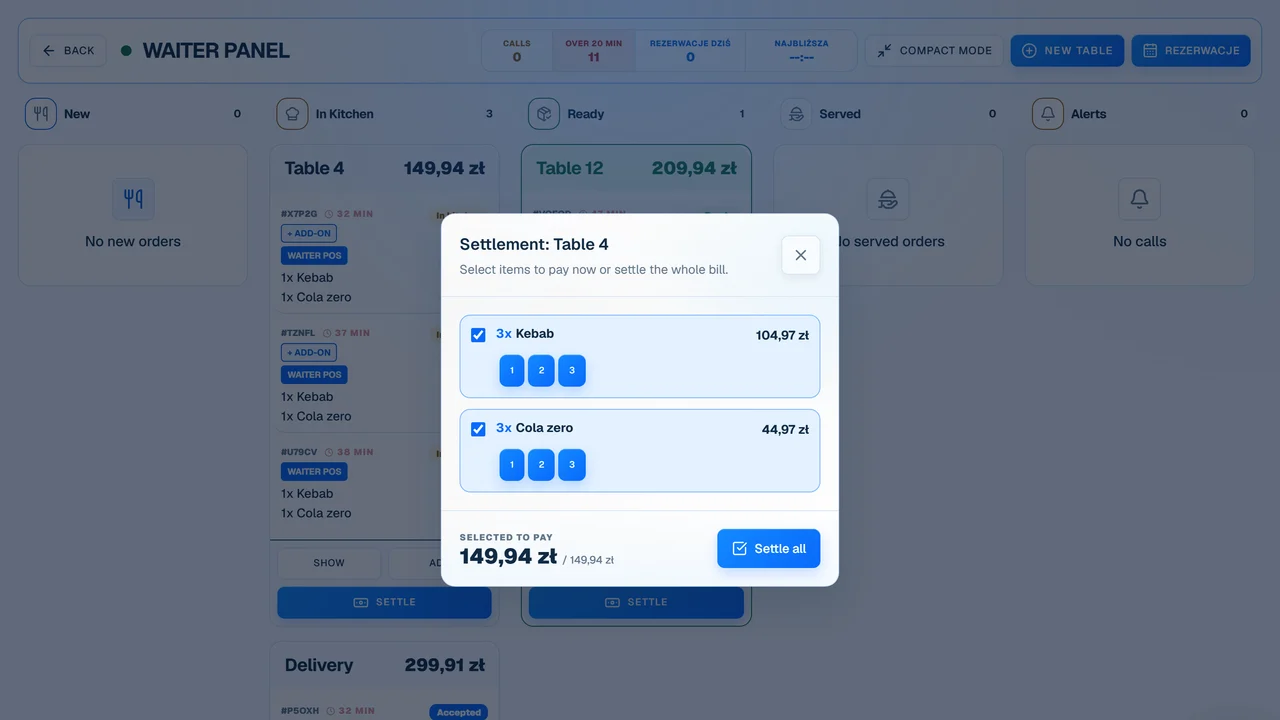
During the demo, we'll walk through a table, variants, kitchen dispatch, extra orders, and the bill to see where the panel truly saves time.